
University administrators reviewing institutional operations through a connected education ERP platform

Custom software for educational institutions

Education ERP Software for Schools, Colleges and Universities

Wowdigitals designs and develops custom College ERP, School ERP, university management, admission and online examination systems around the way your institution actually operates.

Role-based access Phased implementation Integration-ready Responsive portals

A connected institutional platform

What is a custom education ERP?

A custom education ERP is a unified software platform created around the academic, administrative and financial workflows of a particular institution or group of institutions. It replaces disconnected spreadsheets, repeated data entry and isolated applications with coordinated processes and a dependable source of information. Instead of asking every department to adapt to a generic product, the platform reflects the institution’s programs, terminology, approval structure, reporting needs and responsibilities.

For a school, that may mean linking enquiry, enrolment, classes, attendance, homework, examinations, report cards, fees, transport and parent communication. For an engineering or medical college, it may also include semester structures, credits, laboratories, clinical or practical requirements, faculty workload, internal assessment, placement activity and accreditation evidence. A university may need multi-campus governance, affiliated-college structures, examination control, research administration, degree processing and consolidated analytics.

The objective is not to digitize paperwork one screen at a time. A successful platform improves how information moves between people. When an applicant becomes a student, approved admission data should become the initial student record rather than being typed again. When a course registration changes, the relevant timetable, attendance and examination rules should reflect that decision. When a fee is received, the authorized finance and student views should update without competing versions of the truth.

Direct answer

Wowdigitals develops custom education management systems for schools, engineering colleges, medical colleges, multidisciplinary colleges, training institutions and universities. Solutions can include College ERP, School ERP, online admissions, student information, academics, examinations, fees, HR, library, hostel, transport, portals, reporting and integrations.

Why institutions outgrow disconnected software

Educational institutions often acquire technology department by department. Admissions may use an online form, accounts may work in a desktop package, faculty may maintain attendance in spreadsheets, the examination cell may use another application and management may receive manually assembled reports. Each tool can solve an immediate problem, but the institution gradually develops duplicate identities, inconsistent codes, unclear ownership and reconciliation work.

These gaps are expensive even when they do not appear on a technology budget. Staff spend time checking whether two records refer to the same student, correcting data copied between systems, answering questions that a self-service portal could resolve and preparing recurring reports from multiple sources. Students experience the same fragmentation as repeated form filling, unclear status, delayed updates and several logins. Leadership receives information later than the decisions it is supposed to support.

A custom platform gives the institution an opportunity to define the authoritative record, automate predictable hand-offs and make responsibility visible. It does not remove human judgment from admissions, assessment or student support. It puts reliable information and agreed rules around those decisions. The result is a system that supports people instead of adding another layer of administration.
Education technology solutions

Build the modules your institution needs—and connect them properly.

Start with one operational priority or plan a phased institutional platform. Each solution is designed around defined users, responsibilities, data relationships and measurable service improvements.

College ERP

Connect admissions, departments, semesters, attendance, examinations, fees, faculty work and student services in one role-based platform.

School ERP

Coordinate enrolment, classes, timetables, attendance, homework, report cards, fees, transport and parent communication.

Online Examination System

Manage question banks, secure assessments, evaluation, moderation, results and audit-ready examination workflows.

Admission Management

Move enquiries and applications through eligibility checks, document verification, merit decisions, payments and enrolment.

University Management

Support multi-campus, multi-college and multi-department structures with shared governance and delegated administration.

Academic & Student Services

Create a reliable student record across curriculum, attendance, advising, progression, certificates and alumni transitions.

Designed for institutional context

Software for schools, professional colleges and universities

“Education ERP” describes a broad category, but the operating model of a K–12 school is not the same as that of an engineering college, a medical college or a university. The student lifecycle, academic calendar, assessment rules, regulator expectations and stakeholder relationships can differ substantially. We begin with the institution’s context before recommending modules or technology.

School ERP software

A School ERP should make everyday coordination easier for administrators, teachers, students and parents. Typical workflows include enquiries, admission, class and section allocation, attendance, timetable, homework, assessments, report cards, fee collection, transport, visitor or gate processes and communication. The experience must work well on phones because many parents and staff members will use it between other responsibilities.

The platform can support different academic boards, grading approaches and reporting formats without making every change dependent on a developer. Teachers need focused screens that reduce data-entry time. Parents need clear information about attendance, assignments, notices, fee status and results. Administrators need governance over permissions, calendars, master data and publication. The system succeeds when each audience sees an appropriate, understandable slice of the same institutional record.

Engineering and professional college ERP

Engineering colleges commonly require program, branch, regulation, semester, subject, credit and batch structures. Workflows may extend to laboratory allocation, internal assessment, faculty workload, electives, backlogs, placement preparation, projects and accreditation evidence. A custom College ERP can represent those relationships directly instead of forcing staff to maintain critical academic logic outside the system.

Professional institutions also need flexibility when regulations change. Course schemes, assessment weights, promotion rules and reporting formats should be configurable within agreed governance boundaries. Historical records must remain interpretable after a new regulation or curriculum is introduced. Careful data modeling at the start is therefore more important than a long list of screens.

Medical college management software

Medical education combines classroom learning with practical, laboratory and clinical activity. Depending on scope and institutional policy, a platform may need to coordinate departments, rotations, postings, competencies, logbooks, internal assessment, attendance requirements, faculty activity and examination eligibility. These workflows require detailed discovery with academic and administrative subject-matter experts; generic assumptions can create serious operational gaps.

Where a medical college is connected to a teaching hospital, integration boundaries must be defined carefully. Education records, clinical systems and sensitive health information have different purposes and access requirements. We map what should be connected, what should remain separate and which data should never be copied into an academic platform without a lawful and operational reason.

University ERP and multi-campus management

A university platform may serve central administration, schools or faculties, constituent colleges, affiliated institutions, departments, examination bodies and thousands of learners. The architecture must support shared policies while allowing delegated work. Central teams may own program definitions, identities, examination rules and consolidated reporting, while campuses or colleges manage schedules, attendance, local approvals and student services.

Multi-entity design is not simply a filter added to a single-college application. It affects identifiers, roles, calendars, data visibility, workflow routing, integrations, reporting and support. We model these boundaries deliberately so that growth does not turn into duplicated databases or unsafe access.

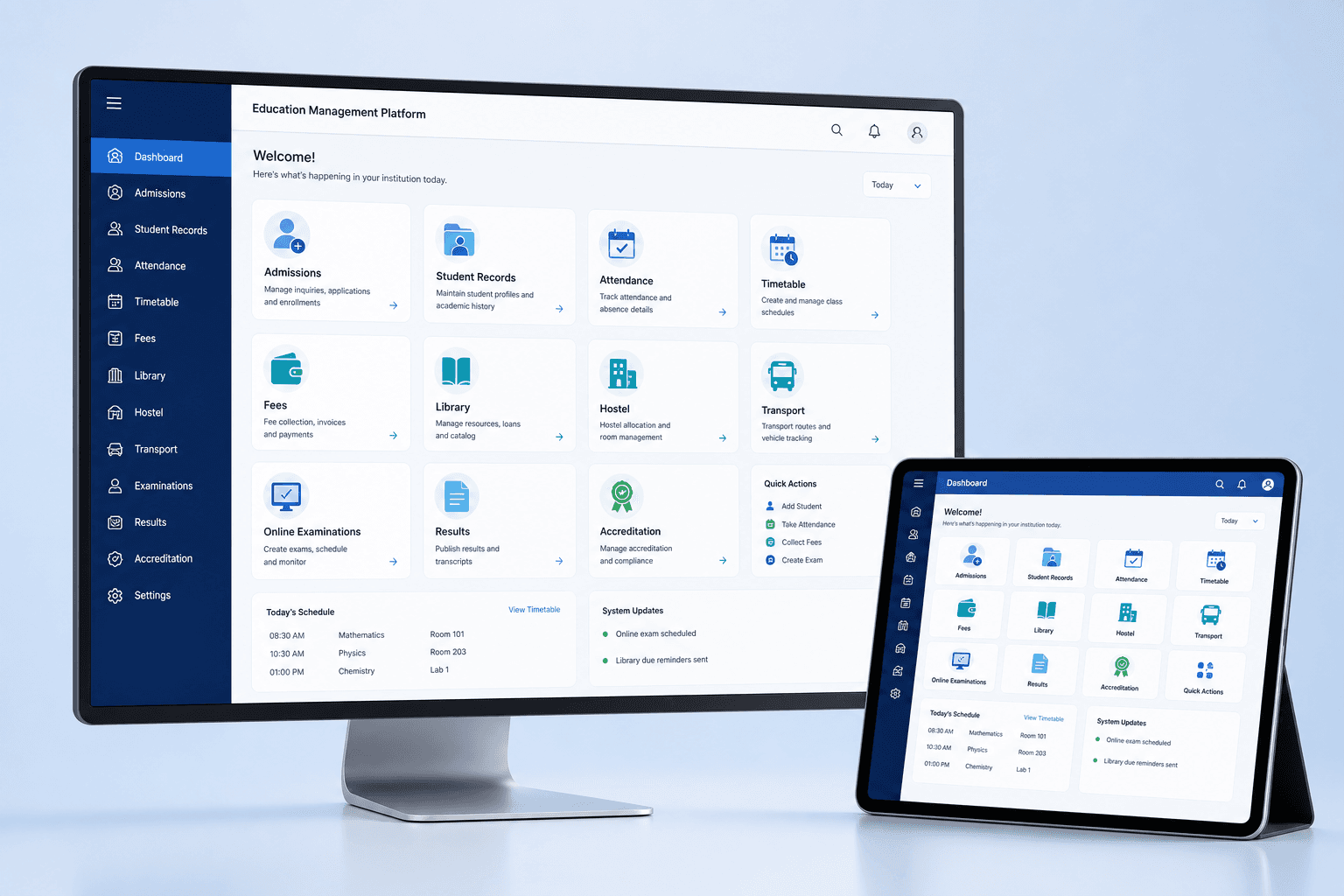
Education management platform dashboard showing admissions, attendance, fees, library, examinations and accreditation modules
A unified, role-based platform can connect academic administration, student services and institutional reporting.

From enquiry to alumni

Core education ERP modules in detail

The right module set depends on the institution. The following capabilities illustrate how a connected platform can support the complete learner and administrative lifecycle.

Student information system

The student information system is the controlled record of identity, contact information, program, batch, enrolment status, academic history and approved documents. It should preserve changes over time rather than overwrite history without explanation. Authorized staff need efficient search, validation and correction workflows, while students need a clear way to review permitted information and request updates.

A carefully designed student record reduces duplication across admissions, academics, examinations and finance. It also establishes consistent institutional identifiers and relationships with guardians, sponsors, departments or campuses. Access is limited by role, purpose and scope, with sensitive actions logged for review.

Academic structure and curriculum

This module represents programs, regulations, terms, courses, credits, prerequisites, electives and assessment components. It provides the foundation for registration, timetable, attendance, examinations, progression and transcripts. Institutions can manage effective dates so that different student cohorts remain connected to the correct curriculum.

Good curriculum design makes policy visible. Staff can understand which rules apply to a learner, and the system can prevent invalid combinations before they create downstream work. Configurable structures also support multidisciplinary offerings, choice-based credits and curriculum revisions.

Attendance and timetable

Attendance can be recorded by faculty, imported from approved devices or received through an integration. The platform can calculate status according to institutional rules, identify missing sessions and notify authorized users when attention is required. It should support corrections through a documented approval path instead of silent editing.

Timetable planning connects courses, faculty, rooms, laboratories, batches and time slots. Conflict checks help coordinators identify double bookings, while published views give each user only the schedule relevant to them. Changes can trigger targeted notifications rather than broad, confusing announcements.

Fees, billing and student accounts

Fee management may cover structures by program or category, instalments, concessions, scholarships, sponsorships, invoices, receipts, dues, refunds and approved adjustments. Payment gateway integration can update transaction status while preserving reconciliation and exception handling. Finance teams retain the controls needed for approvals and audit.

Students and parents benefit from transparent account views, downloadable receipts and clear due information. Management reporting can separate billed, collected, pending, waived and refunded amounts without relying on manually merged sheets. Integration with an accounting system can be designed where appropriate rather than duplicating a complete financial ledger.

Faculty, HR and workload

Faculty profiles can connect qualifications, department, appointment, teaching allocation, advising, research or committee responsibilities and approved leave. Workload planning makes allocation visible across courses, laboratories and institutional duties. HR functions may include employee records, attendance, leave and payroll integrations according to scope.

Permissions are especially important because academic coordinators, department heads and HR teams have different responsibilities. The platform should support delegated review while protecting employment and personal information from unnecessary exposure.

Library, hostel and transport

Student services become more useful when they share approved identity and status information. Library workflows can manage catalogues, members, circulation, reservations and fines. Hostel modules can support room inventory, allocation, occupancy, requests and clearance. Transport modules can represent routes, stops, vehicles, allocations and communication.

These modules should not each create another version of the student. They reference the controlled institutional identity and publish only the information required for service delivery. This reduces errors during enrolment, withdrawal and program changes.

Communication and self-service portals

Role-based portals can provide applicants, students, parents, faculty and staff with relevant tasks, notices and records. A student might register for courses, view attendance, download a fee receipt, submit a request and check a result. A faculty member might manage sessions, assessments, advisees and approvals. An administrator sees configuration, exceptions and institutional queues.

Communication can use in-app notices, email, SMS or approved messaging integrations. Templates, recipient rules and delivery records help the institution communicate consistently. Critical information remains available in the portal rather than disappearing inside a message thread.

Reports, accreditation and decision support

Operational reports answer recurring questions about admissions, enrolment, attendance, results, finance and services. Accreditation workflows can organize evidence ownership, data definitions, review status and document references. Management dashboards should use agreed metrics with clear definitions rather than decorative charts.

When reporting requirements change, governed report builders or configurable templates can reduce dependence on one-off development. Data exports should respect permissions and include enough context to prevent misinterpretation. The aim is faster, more reliable decision support—not more reports than anyone can use.

Assessment technology

Custom online examination system

An online examination system manages more than the candidate’s test screen. Institutions need a controlled process for question creation, review, paper design, scheduling, eligibility, candidate communication, delivery, evaluation, moderation, result approval and publication. A custom solution can reflect the institution’s assessment policy while giving each participant a focused role.

Question banks may support subjects, units, learning outcomes, difficulty, question types, marks, negative marking, language and approval status. Blueprint rules can guide paper composition, and authorized setters can create or generate papers from approved content. Version history and review records reduce uncertainty about which question was used and who approved it.

Candidate delivery can include timed assessments, randomization, autosave, navigation rules, accessibility considerations and recovery from short connectivity interruptions. Objective questions may be scored automatically, while descriptive, numerical, drawing or file-based responses can move through assigned evaluation and moderation queues. The exact feature set should match the assessment; excessive restriction can harm legitimate candidates without materially improving integrity.

Security is risk-based. Options can include authenticated access, controlled schedules, secure question handling, device or browser checks, IP policies, event logs and proctoring integrations. No single control proves examination integrity. We work with the institution to combine policy, supervision, technology and incident procedures in a proportionate design.

After evaluation, the platform can apply approved calculation rules, moderation, grace policy, result holds and publication authorization. Students receive results through a secure portal, while the examination team retains evidence of changes and approvals. Where the examination system connects to the ERP, course registrations, eligibility and final results can move through controlled interfaces rather than repeated uploads.

Controlled access

Separate privileges for setters, reviewers, evaluators, moderators, administrators and candidates.

Flexible assessments

Objective, descriptive and mixed examinations with configurable delivery and evaluation workflows.

Audit-ready operations

Traceable question, schedule, evaluation, moderation and publication events for authorized review.

Applicant experience and administrative control

Admission management system

An admission management system should guide applicants while helping the institution process decisions consistently. The journey may begin with an enquiry or program search and continue through account creation, application, document upload, eligibility checks, entrance examination, counselling, merit processing, offer, payment and final enrolment. Each stage needs a clear owner, status and communication rule.

Applicants benefit from instructions written around their decisions rather than internal department language. The portal can show program requirements, saved progress, missing information, payment status, submitted documents and next steps. Responsive design is essential because many applicants complete forms or upload information from a phone. Accessible labels, validation and error recovery reduce avoidable abandonment.

Admission teams need configurable application periods, program capacity, categories, eligibility rules, document checklists and reviewer assignments. Exceptions should follow an approval path instead of being handled through private messages. Search, filters, queues and bulk actions can help teams process volume while still preserving the history of each decision.

Where selection depends on entrance scores, merit, reservation policy, counselling or interviews, the platform can support the approved institutional process without turning complex policy into an opaque calculation. Rules, effective dates and manual interventions are documented. Final approval remains visible and accountable.

The greatest efficiency comes at conversion. Once an applicant accepts an offer and completes required steps, validated data can create the initial student record, finance account, program enrolment and portal identity. This controlled hand-off prevents the common problem of asking newly admitted students to provide the same details repeatedly.

Reliable foundations

Architecture, integrations, privacy and security

An institutional platform handles information that affects identity, academic standing, finance and access to services. Architecture therefore begins with boundaries: which system owns each record, which users need which actions, which integrations are authoritative and how failures are handled. We prefer modular services and clear interfaces over hidden dependencies that make future change risky.

Role-based access control can combine institutional scope, job responsibility and action-level permissions. A department coordinator may work only within assigned programs, a faculty member may see current classes, a finance user may manage accounts without seeing assessment content and a student may access only their own published information. High-risk changes can require additional approval or verification.

Audit trails record meaningful events such as status changes, result publication, fee adjustments, permission updates and data exports. Logs are useful only when they contain the right context and can be reviewed without exposing more data than necessary. Retention rules should match institutional policy and applicable requirements.

Integration planning covers both technology and operations. Payment gateways, biometric devices, learning management systems, accounting software, identity providers, library tools, communication services and external portals may use APIs, files or scheduled exchanges. We define ownership, frequency, validation, retries, reconciliation and support before an integration becomes a production dependency.

Privacy is addressed through data minimization, purpose-based access, secure transmission, protected storage, retention planning and responsible operational procedures. Security controls can include strong authentication, session management, encryption, rate limits, input validation, backup testing, monitoring and vulnerability maintenance. The final design depends on deployment context and risk; security is not a one-time checklist.

Performance and resilience are also part of trust. Admission deadlines, fee due dates and result publication can create sharp traffic peaks. Capacity planning, caching, background processing and database optimization help the system remain responsive. Backups are paired with restoration tests and recovery responsibilities so they are useful during an incident.

Implementation approach

Move from institutional discovery to dependable adoption.

Education ERP implementation is an organizational change project supported by software. Our phased process keeps policy, users, data and technical delivery aligned.

  1. 01

    Discovery and process mapping

    We interview process owners and representative users, review forms and reports, map current systems and identify the decisions each workflow must support. The output is not a transcription of every existing step. It distinguishes essential policy from historical workarounds and identifies where standardization will create value.

  2. 02

    Scope, priorities and solution architecture

    Requirements are organized into releases according to institutional value, dependency and risk. We define roles, data ownership, integrations, migration, reporting and non-functional needs. Wireframes or prototypes make important journeys visible before full development begins.

  3. 03

    Iterative design and development

    Modules are built in reviewable increments. Administrators, faculty and other users see realistic workflows early enough to correct assumptions. Reusable interface patterns improve consistency, while configurable rules reduce the need for code changes when policies evolve.

  4. 04

    Data migration and integration validation

    Existing records are inventoried, mapped, cleaned and tested through trial migrations. Totals and sample histories are reconciled with owners. Integrations are tested for successful exchange, duplicate prevention, failure handling and recovery—not merely a single happy-path response.

  5. 05

    User acceptance, training and rollout

    Acceptance scenarios reflect real responsibilities and academic timelines. Role-based training uses the institution’s processes and terminology. A pilot or phased rollout can reduce risk, and cutover planning identifies ownership for communications, support, data freeze and contingency decisions.

  6. 06

    Support and continuous improvement

    After launch, support covers incidents, questions and agreed maintenance. Usage patterns and operational feedback help prioritize improvement. New programs, regulations, campuses or integrations can be added through a governed roadmap rather than emergency changes.

What makes an education ERP project successful?

Visible executive sponsorship, empowered process owners, clean master data, timely decisions, representative user testing and a phased adoption plan matter as much as the software. We establish these responsibilities during discovery so technology and institutional change move together.

Custom without unnecessary complexity

Why choose custom development instead of forcing a generic ERP?

Custom development is appropriate when the institution has distinctive academic structures, approval workflows, reporting obligations, integrations or service expectations that standard products cannot support without extensive workarounds. It provides control over priorities, user experience and the roadmap. It can also reduce the long-term cost of maintaining disconnected extensions around a product that never truly fits.

Custom does not mean every element should be invented. Authentication, notifications, exports and common interface patterns can follow proven approaches. The investment should focus on institutional workflows and integrations that create meaningful differentiation or operational value. We challenge requirements that add complexity without improving control, service or decision quality.

Ownership and maintainability must be planned from the beginning. Source control, environments, deployment, documentation, monitoring and support responsibilities should not depend on one person’s memory. The institution should understand where the system runs, how changes are released, how data is protected and what happens when a vendor or integration changes.

Some institutions benefit from a hybrid approach: retaining a dependable existing system for a well-served function while building custom portals, workflows or reporting around it. Discovery compares replacement, integration and staged modernization honestly. The recommended solution should solve the institution’s problem, not maximize the amount of software built.

Plan your institutional platform

Tell us where your current process creates the most friction.

Whether you need a focused admission or examination system, a College ERP, a School ERP or a multi-campus university platform, we can help define a practical first release and long-term architecture.

Education ERP FAQ

Questions institutions ask before starting.

These concise answers help leadership and project teams evaluate scope, fit and implementation.

What is an education ERP system?+

An education ERP is a connected software platform that manages academic and administrative processes such as admissions, student records, attendance, timetables, examinations, fees, HR, library, hostel, transport, communication and reporting. A well-designed ERP gives each authorized user the tools and information needed for their role while maintaining one dependable institutional record.

Can Wowdigitals build a custom College ERP or School ERP?+

Yes. Wowdigitals develops custom education management software for schools, engineering colleges, medical colleges, multidisciplinary institutions and universities. The scope can begin with one high-priority workflow or cover a phased, institution-wide platform. Discovery determines modules, roles, integrations, migration needs, approvals and reporting requirements.

Can the ERP support multiple campuses or affiliated colleges?+

Yes. The architecture can represent universities, campuses, constituent or affiliated colleges, departments, programs, academic years and batches. Governance can be centralized where consistency matters and delegated where local teams need operational control.

Does the system include online admissions and fee collection?+

It can. Admission workflows may cover enquiries, applications, document uploads, eligibility, entrance tests, merit lists, counselling, offers, payments and enrolment. Fee workflows may include structures, concessions, instalments, invoices, receipts, dues, refunds and payment gateway integration.

Can you develop an online examination system?+

Yes. A custom online examination solution can support question banks, blueprints, randomized papers, schedules, candidate authentication, timed tests, objective and descriptive questions, evaluation, moderation, result publishing and audit logs. Security measures are selected according to the assessment risk and operating environment.

Can existing institutional data be migrated?+

Yes. Migration is planned around source quality, ownership and operational risk. We inventory existing spreadsheets and systems, map fields, clean and validate data, perform trial imports, reconcile totals and retain agreed archives before the production cutover.

Will faculty, students and parents have separate portals?+

Yes. Role-based web portals and mobile-friendly experiences can be created for administrators, management, faculty, non-teaching staff, students, applicants, parents, examiners, finance teams and other approved stakeholders. Each role sees only permitted data and actions.

How long does education ERP development take?+

The schedule depends on institutional size, module scope, integrations, data condition and decision availability. A focused module can be delivered sooner than a full campus platform. We normally recommend phased delivery so priority workflows become usable while later modules continue through design, development and validation.

Can the platform integrate with existing systems?+

Yes. Where supported, integrations may connect payment gateways, biometric attendance devices, learning platforms, accounting software, identity providers, SMS and email services, library systems, video platforms, government or university portals and data warehouses. Each integration is assessed for documentation, reliability, security and ownership.

Do you provide support after launch?+

Yes. Support can include monitoring, incident response, updates, backups, user assistance, report changes, performance review, security maintenance and planned feature development. Responsibilities and service levels are defined according to the institution's operating needs.

Your next digital product

Have an Idea? Let’s Turn It Into Something Remarkable.

Tell us what you want to improve, launch or automate. We’ll help you identify a sensible next step.